Viết test với Jest
Trong tutorial này, sử dụng test framework "Jest", bạn sẽ học cách viết unit test bằng TypeScript.
Những gì có thể học trong chương này
Trong chương này, với mục tiêu viết test cho hàm đơn giản bằng Jest, bạn sẽ học những điều sau.
- Cách test hàm TypeScript bằng Jest
- Cách giới thiệu Jest
- Cách viết test trong Jest
- Cách chạy test
- Cách đọc kết quả
Mục đích của chương này không phải là hiểu hoàn toàn Jest. Thay vào đó, trọng tâm là trải nghiệm thực tế Jest là gì. Do đó, nội dung khá tối thiểu, nhưng ngược lại, đây là nội dung đơn giản có thể thử Jest trong thời gian ngắn, nên hãy thử thực hành.
Jest là gì
Jest là test framework của JavaScript. Cũng có thể viết test bằng TypeScript. Jest có thể test không chỉ frontend library như React hay Vue, mà còn package cho Node.js. Nói chung, hầu hết code viết bằng JavaScript hoặc TypeScript đều có thể test bằng Jest.
Những thứ cần thiết cho tutorial này
Những thứ cần thiết cho tutorial này như sau.
- Node.js v22 trở lên
- Yarn v1 (Tutorial này được xác nhận hoạt động với v1.22.19)
Về cách giới thiệu Node.js, vui lòng xem Chuẩn bị môi trường code.
Chúng ta sẽ sử dụng Yarn làm package management tool. Hãy install trước. Nếu đã install rồi thì có thể bỏ qua bước này.
shell
shell
Tạo project
Đầu tiên, tạo project để sử dụng cho tutorial này.
shell
shell
Tạo package.json ở project root.
shell
shell
Nội dung của package.json như sau.
package.jsonjson
package.jsonjson
Install TypeScript
Install TypeScript vào project.
shell
shell
Tiếp theo, tạo tsconfig.json.
shell
shell
Install Jest
Hãy install Jest vào project. Cần install 3 package sau.
- jest
- ts-jest
- @types/jest
Có thể install tất cả cùng lúc bằng lệnh sau.
shell
shell
jest là Jest core. Nếu là project chỉ có JavaScript, chỉ cần install package này là có thể bắt đầu test. ts-jest là để làm cho Jest tương thích với TypeScript. Khi install ts-jest, có thể thực thi test code viết bằng TypeScript trực tiếp mà không cần compile. @types/jest là file định nghĩa type của Jest API. Type information của TypeScript được bổ sung, nên có thể type check test code.
Tạo file config của Jest
Jest không thể test TypeScript trực tiếp. Vì vậy, ở đây chúng ta thêm config để Jest có thể test TypeScript code.
Chạy lệnh sau sẽ tạo file config Jest jest.config.js.
shell
shell
Nội dung của jest.config.js được tạo như sau.
jest.config.jstsmodule .exports = {preset : "ts-jest",testEnvironment : "node",};
jest.config.jstsmodule .exports = {preset : "ts-jest",testEnvironment : "node",};
Comment @type này là để cung cấp type information cho editor. Viết điều này giúp input completion hoạt động trong editor.
Checkpoint
Hãy xác nhận không thiếu file đã tạo cho đến giờ.
text
text
Xác nhận Jest có hoạt động không
Ở đây, trước khi viết test code thực tế, chúng ta tạo test file để xác nhận xem có thể thực thi test code bằng Jest không.
Test file có thể thực thi bằng Jest có naming convention. File có tên kết thúc bằng .test.ts hoặc .spec.ts sẽ là test file. Tạo file check.test.ts để xác nhận hoạt động.
shell
shell
Nội dung của check.test.ts như sau.
check.test.tststest ("check", () => {console .log ("OK");});
check.test.tststest ("check", () => {console .log ("OK");});
Sau khi save file, hãy chạy lệnh jest.
shell
shell
Sẽ có kết quả như sau.
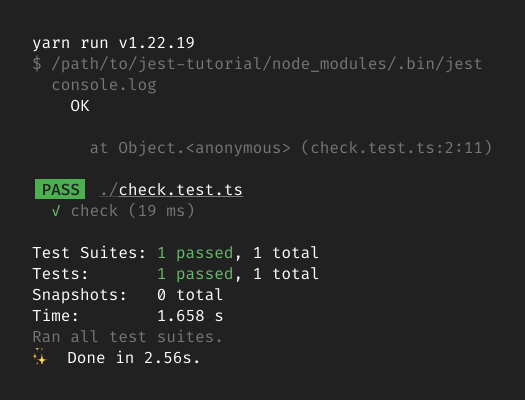
Nếu kết quả hiển thị check.test.ts là "PASS", test file đã được thực thi.
Sau khi xác nhận chạy không có vấn đề, hãy xóa check.test.ts.
Lệnh xóashell
Lệnh xóashell
Hàm test trong tutorial này
Từ đây, chúng ta sẽ viết TypeScript code cần test và test nó.
Cụ thể, chúng ta sẽ tiến hành với ví dụ viết test cho hàm đơn giản như sau.
tsisZero (value : number): boolean {returnvalue === 0;}
tsisZero (value : number): boolean {returnvalue === 0;}
Hàm isZero này kiểm tra xem số có phải là zero hay không.
Tạo file cần test
Đầu tiên, tạo file chứa hàm này. Tên file là isZero.ts.
shell
shell
Sau khi tạo file này, cấu trúc file của project như sau.
text
text
Nội dung của isZero.ts như sau.
isZero.tstsisZero (value : number): boolean {returnvalue === 0;}// Chú ý: Không thể test như thế này.
isZero.tstsisZero (value : number): boolean {returnvalue === 0;}// Chú ý: Không thể test như thế này.
Như thế này, hàm isZero không thể test được. Để có thể test bằng Jest, cần export hàm. Để export hàm, thêm keyword export trước function.
isZero.tstsisZero (value : number): boolean {returnvalue === 0;}
isZero.tstsisZero (value : number): boolean {returnvalue === 0;}
Viết test code
Viết code test hàm isZero ở trên.
Trong Jest, test code được viết trong file khác với file cần test. Hãy tạo test file. Tên file là tên file muốn test thêm .test.ts. Vì file cần test là isZero.ts, ở đây tên file là isZero.test.ts.
shell
shell
Sau khi tạo file này, cấu trúc file của project như sau.
text
text
Để xử lý hàm cần test trong test code, đầu tiên cần import hàm. Dùng câu lệnh import để load hàm isZero.
isZero.test.tstsisZero } from "./isZero";
isZero.test.tstsisZero } from "./isZero";
Tiếp theo, thêm test case đầu tiên. Test case này kiểm tra xem khi truyền 0 vào hàm isZero thì có trả về true không.
isZero.test.tstsisZero } from "./isZero";test ("Truyền 0 thì trả về true", () => {constresult =isZero (0);expect (result ).toBe (true);});
isZero.test.tstsisZero } from "./isZero";test ("Truyền 0 thì trả về true", () => {constresult =isZero (0);expect (result ).toBe (true);});
Trong Jest, dùng hàm expect và matcher để mô tả kết quả có phải giá trị mong đợi không. Matcher là method có trên return value của hàm expect. Trong ví dụ trên, toBe là matcher. Argument của method này là giá trị mong đợi. Trong test case trên, giá trị mong đợi là true, nên viết toBe(true).
Matcher toBe giống với so sánh bằng nghiêm ngặt (===) của JavaScript. Do đó, expect(result).toBe(true) nội bộ đánh giá result === true. Nếu đánh giá này đúng, test pass. Ngược lại, nếu sai thì test fail.
Matcher có nhiều loại khác ngoài toBe. Tutorial này không giải thích chi tiết, nếu muốn biết thêm, hãy xem reference của tài liệu chính thức.
Chạy test
Đã tạo test case đầu tiên, hãy chạy test bằng Jest.
shell
shell
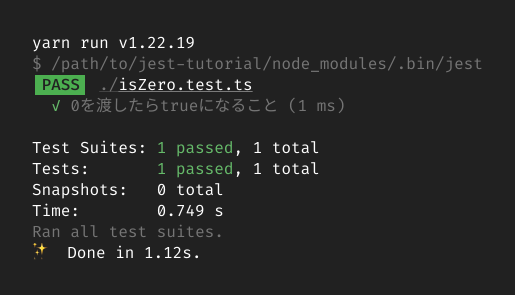
Nếu kết quả test hiển thị như sau, test đã thực thi được.
Thêm test case
Hãy thêm test case. Lần này, thêm case kiểm tra khi truyền 1 vào hàm isZero thì return value là false.
isZero.test.tstsisZero } from "./isZero";test ("Truyền 0 thì trả về true", () => {constresult =isZero (0);expect (result ).toBe (true);});test ("Truyền 1 thì trả về false", () => {constresult =isZero (1);expect (result ).toBe (false);});
isZero.test.tstsisZero } from "./isZero";test ("Truyền 0 thì trả về true", () => {constresult =isZero (0);expect (result ).toBe (true);});test ("Truyền 1 thì trả về false", () => {constresult =isZero (1);expect (result ).toBe (false);});
Sau khi thêm test case, chạy Jest lại để chạy test code.
shell
shell
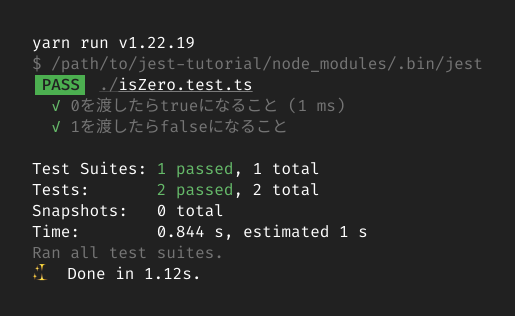
Lần này kết quả sẽ như sau.
Đến đây tutorial trải nghiệm Jest đã hoàn thành.